

Quick answer: The Search Console multi-country filter lets you select several countries in the Performance report and see their combined clicks, impressions, CTR and average position as one total. Use it for regional GCC reporting, then split the total by country, device and language before you make decisions, because a combined number can hide a failing market.
Google has added a Search Console multi-country filter to the Performance report. For GCC businesses, that removes the spreadsheet step between Saudi Arabia, UAE and Qatar reports. It also creates a reporting risk, because a combined number can hide a falling market.
Google Search Central announced the change on LinkedIn on October 6, 2026. This guide explains how to use the Search Console multi-country filter, where it misleads, and how to verify the data before it reaches a management report.
Table of Contents
- What Is the Search Console Multi-Country Filter?
- How Do You Filter Multiple Countries in Search Console?
- What Is the Difference Between Filter and Compare?
- How Should GCC Businesses Group Countries?
- What Are the Risks of the Search Console Multi-Country Filter?
- How Do You Verify Combined Data Before Reporting?
- Do You Still Need Looker Studio or the Search Console API?
- Final Takeaways for the Search Console Multi-Country Filter
- Frequently Asked Questions
What Is the Search Console Multi-Country Filter?
The Search Console multi-country filter lets you select several countries in the Performance report and view their combined clicks, impressions, CTR and average position as one total. Google Search Central announced the update on October 6, 2026, and before it, you could analyze only one country at a time.
The Search Console multi-country filter changes reporting, not rankings. Your positions in Google do not move because you grouped countries. Search Console only aggregates the data it already holds in a different way.
What Has Google Confirmed So Far?
Google confirmed that the Performance report now shows combined Google Search traffic for several selected countries, as stated in its October 6, 2026 announcement. The announcement leaves several practical details open, which affects how much you should rely on the feature in client reporting today:
- Google’s post mentions devices, but does not say what changed in the Device filter.
- Google does not state whether every property received the update on the same day.
- The published screenshot shows the Country filter only.
Treat anything beyond the country filter as unconfirmed until Google’s Performance report documentation says otherwise.
How Do You Filter Multiple Countries in Search Console?
To filter multiple countries, open the Performance report, click the Country filter, tick each market on the Filter tab, and press Update. The report then shows combined clicks, impressions, CTR and average position for the selected countries, and you can stack Query, Page and Device filters on top of that selection.
- Open your property and go to Performance > Search results.
- Click the Country filter at the top of the report.
- Stay on the Filter tab, not Compare.
- Tick the markets you want to group, such as Saudi Arabia, the United Arab Emirates and Qatar.
- Click Update and read the combined totals.
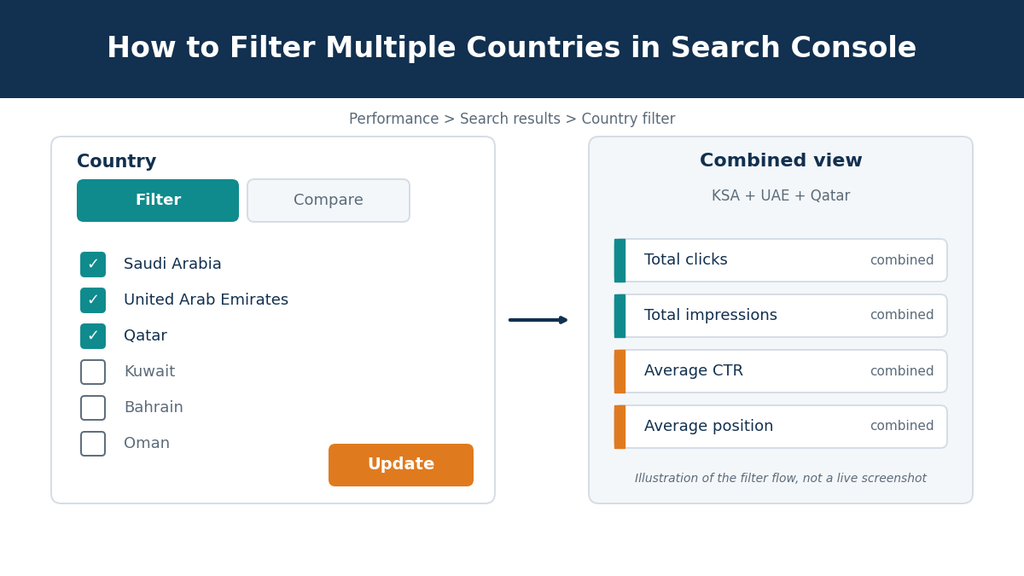
Button labels may differ slightly between interface versions. If the Search Console multi-country filter does not appear in your account, the update may not have reached your property yet.
What Is the Difference Between Filter and Compare?
Filter merges the selected countries into one combined total, while Compare places countries next to each other so you can contrast them. Use Filter when you need one regional number for reporting, and use Compare when you need to find which market drives a change. Most GCC reports need both views.
| Tab | Output | Best Use | Main Risk |
|---|---|---|---|
| Filter | One combined total for all selected countries | Regional trend reporting | Hides market-level declines |
| Compare | Countries side by side | Finding the market behind a change | Harder to summarize in one number |
How Should GCC Businesses Group Countries?
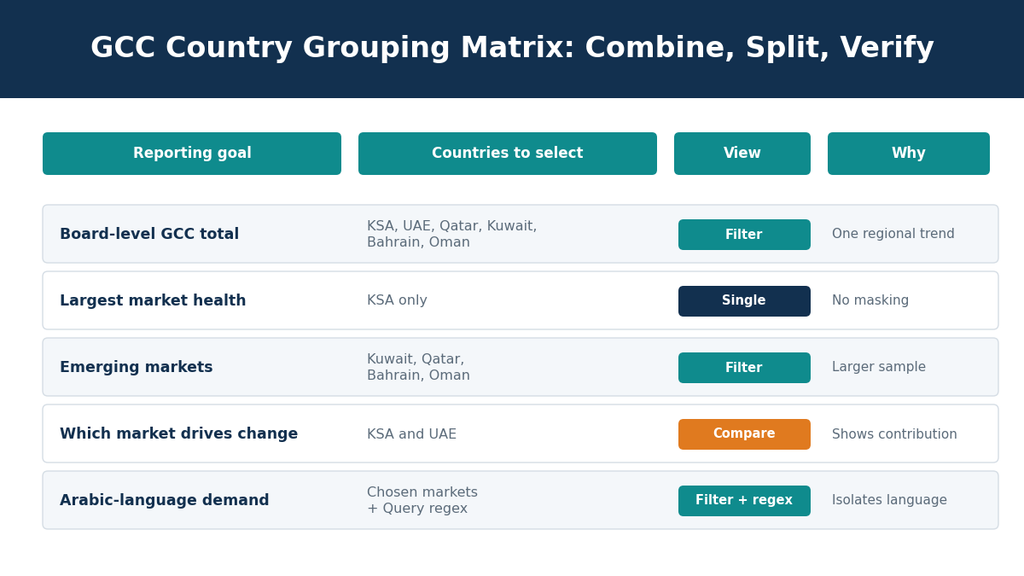
Group countries by shared search behavior and commercial intent, not by geography alone. Saudi Arabia and the UAE usually deserve separate views because market size, competition and the Arabic-English query mix differ, while Kuwait, Qatar, Bahrain and Oman are better candidates for a combined group.
What Is the Combine, Split, Verify Framework?
The Combine, Split, Verify framework is a three-stage reporting method for Search Console multi-country filter data. You combine markets to read the regional trend, split the total by country, device and language to find the cause, and verify the result before it reaches a report. The matrix below maps each reporting goal to a view.
Need GCC reporting built around the Search Console multi-country filter without hiding market-level drops? Our SEO services in Saudi Arabia include Search Console structure, grouping rules and dashboard design for multi-country sites.
What Are the Risks of the Search Console Multi-Country Filter?
Combined country data can hide market-level problems because growth in one country offsets decline in another, and it blends CTR and average position across markets with different competition. Inspect each market before you act on a combined trend, especially when the total looks stable or only moves slightly.
How Can a Combined Total Hide a Traffic Drop?
A combined total hides a drop when growth in one country cancels a decline in another. In this illustrative example, Saudi Arabia falls from 10,000 to 8,000 clicks while the UAE rises from 6,000 to 8,000, so the combined total stays at 16,000 clicks and the report looks flat.
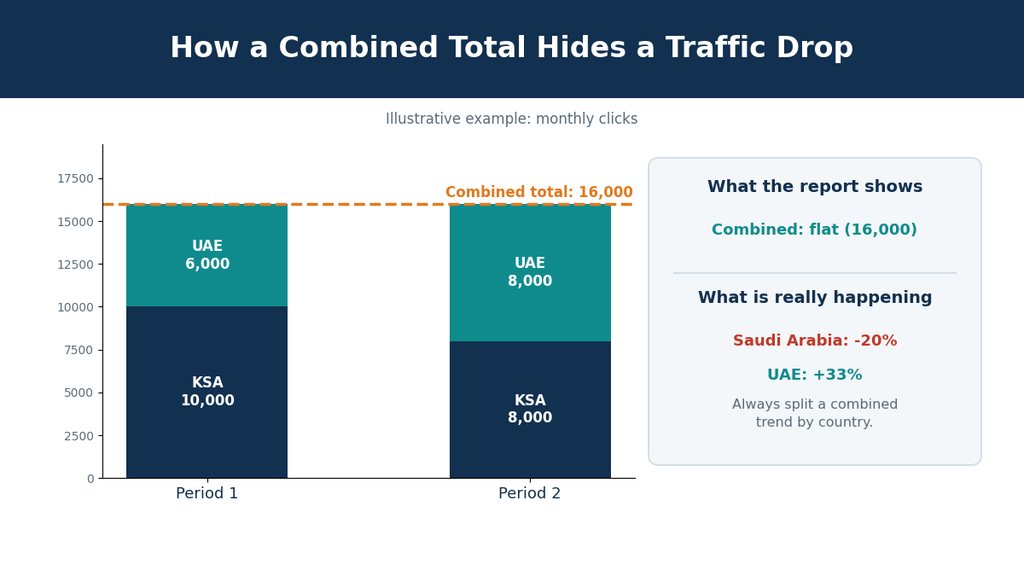
A flat line like that can reach a management deck as “stable.” Meanwhile the largest market is losing a fifth of its clicks. The cause could be a ranking loss, a competitor, or a page that lost its indexing. Only the split view reveals it.
Key takeaway: Never report a combined GCC trend without checking the largest market on its own. A flat total can hide a 20% drop in one country.
Why Do Combined CTR and Average Position Mislead?
Combined CTR and average position lean toward the country with the most impressions, because CTR is clicks divided by impressions and average position is calculated across impressions. A strong ranking in one market can lift the blended figure while a larger market slips behind it, so the headline number stops describing either market accurately.
Read both metrics per country for any decision about content, keywords or budget. Use the blended figures only as a headline indicator.
What Data Limits Still Apply?
The Search Console multi-country filter does not remove existing Search Console limits, so you must still check them before trusting a combined view. Performance data, query visibility, time zones and export size all affect how complete and comparable your grouped numbers are for GCC reporting:
- Performance data covers a rolling 16-month window.
- Anonymized queries are excluded from query rows, so table rows may not add up to the chart total.
- Dates follow Pacific Time, which can shift daily comparisons against GCC local reporting.
- Interface exports are limited to 1,000 rows per table.
How Do You Verify Combined Data Before Reporting?
Verify combined data by splitting every combined trend into individual markets, devices and query languages before you report it. Run the checklist below whenever the Search Console multi-country filter total moves beyond your tolerance, for example 10%, because it takes only minutes and prevents misleading summaries from reaching management or clients.
- Combine: Filter the GCC markets and note the trend direction and size.
- Split by country: Switch to Compare, or review each country individually.
- Split by device: Add the Device filter and check mobile against desktop.
- Split by language: Add a Query filter with a regex for Arabic and English terms.
- Check pages: Add a Page filter for top landing pages. Confirm that each country version ranks as intended.
- Record: Add an annotation to the chart so future readers know what changed.
Google’s guide to advanced filtering and comparison covers regex and multi-value filters in more detail.
Do You Still Need Looker Studio or the Search Console API?
Smaller sites can work from the Search Console interface alone, but multi-market businesses usually need a reporting layer on top. The Search Console multi-country filter serves quick grouped views, while Looker Studio and the Search Console API or BigQuery export support scheduled dashboards, longer data storage and blended sources such as GA4.
Group data only after your site structure supports it. Separate Arabic and English pages need clean URL patterns and hreflang, otherwise country data points at the wrong URLs. Teams planning that structure can review multilingual Webflow development or custom web design and development services.
Final Takeaways for the Search Console Multi-Country Filter
The Search Console multi-country filter gives GCC teams a faster way to report regional search traffic, but it works best as a starting point. Use grouped views for trends, then split by country, device and language before you make decisions. Check your account for rollout status, because Google has not confirmed timing.
Ready to Get Clear Multi-Country Search Reporting?
If your Search Console multi-country filter reporting needs to show each market clearly, book a technical SEO audit with the Teckcod team. We map Search Console, analytics and site structure into one multi-country plan.
Book a Free SEO ConsultationMore guides: Teckcod SEO articles
Frequently Asked Questions
Can I Select Multiple Countries in Google Search Console?
Yes, Google updated the Performance report so the Country filter accepts several countries and shows their combined Google Search traffic, which you select on the Filter tab and confirm with Update. Google announced the change on October 6, 2026, but has not confirmed whether every property received it at the same time.
How Do I Combine KSA and UAE Data in Search Console?
Open Performance, click the Country filter, tick Saudi Arabia and United Arab Emirates on the Filter tab, and click Update. The report then shows combined clicks, impressions, CTR and average position for both markets, and the Compare tab afterward shows how each country contributes to the total.
Why Can’t I See the Search Console Multi-Country Filter in My Account?
Google has not confirmed whether the update reached all properties on the same day, so the option may not appear in your account yet. Refresh Search Console and check again over the next few days, and use single-country views or the Compare tab to analyze each GCC market in the meantime.