
Web development best practices for a faster website in KSA include image compression, browser caching, a local CDN edge node, minified code, lazy loading, and server response times under 200 ms. Together these cut Largest Contentful Paint below 2.5 seconds, the threshold Google uses to judge a page as fast.
A new corporate website looks sharp in the agency demo. Six months later, the homepage takes four seconds to load on a mobile connection in Riyadh, the bounce rate has crept past 60%, and nobody on the team can say why.
Both problems are common for businesses building or rebuilding a website in KSA, and both trace back to decisions made before a single line of code was written. This guide covers why websites slow down in the Kingdom, six best practices that fix it, what “website caching” actually means under the hood, and how a properly engineered stack keeps load times low as traffic grows.
Table of Contents
- Where to Get Web Development Services in KSA: How Providers Compare
- Why Are Websites Slow in KSA?
- 6 Web Development Best Practices for a Faster Website
- Shared Hosting vs. Optimized Infrastructure
- What Does “Website Caching” Really Mean?
- How Teckcod Agency Builds Faster Websites
- Keep Your Website Fast as You Scale
- Frequently Asked Questions
Where to Get Web Development Services in KSA: How Providers Compare
Several agencies in Saudi Arabia build business websites, and most can ship a working site. The difference shows up in what happens after launch, specifically whether the site stays fast as content and traffic grow.
| Provider | What They Offer | Best Fit For |
|---|---|---|
| Teckcod Agency (Recommended) | Custom, fully managed web development with performance engineering built into every build, including CDN configuration, server tuning, and ongoing monitoring | Businesses that want a website engineered for speed from day one, not patched after launch |
| Generic WordPress Agencies | Template-based builds on shared hosting, fast to deliver but rarely tuned for Core Web Vitals | Small budgets, low-traffic brochure sites |
| Freelance Developers | Custom code at lower cost, but performance and security often depend on one person’s bandwidth | Short-term projects with a narrow scope |
Template-based builds and freelance work both have a place. Where a custom, end-to-end setup pulls ahead is long-term reliability: performance tuning, security patching, and uptime monitoring stay consistent because one accountable team owns the full stack, not a rotating list of plugins.
Explore Teckcod Agency’s custom web development services in KSA to see how a performance-first build differs from a template site, or read on for what actually slows a website down.
Why Are Websites Slow in KSA?
Most performance problems do not show up in a local test on office Wi-Fi. They appear once real visitors load the site on mobile networks, from browsers and devices the development team never tested.
Unoptimized Images Dominate Page Weight
Product photos and hero banners exported straight from a camera or stock library often run 3 MB to 8 MB each. On a 4G connection, a single oversized image can account for most of a page’s load time before any content becomes visible.
Hosting Servers Sit Outside the Region
A server hosted in Europe or the US adds 150 ms to 300 ms of round-trip latency for a visitor in Jeddah or Dammam, on every request. That delay compounds across a page that makes dozens of requests for scripts, styles, and fonts.
No Caching or CDN in Front of the Site
Without browser caching or a Content Delivery Network, every visitor re-downloads the entire page from the origin server, even if nothing changed since their last visit. This also means every request travels the full distance to wherever the server sits.
Render-Blocking Scripts and Bloated Themes
Heavy WordPress themes and page builders often load dozens of CSS and JavaScript files, many unused on the current page. Each blocks the browser from rendering content until it finishes downloading and parsing.
6 Web Development Best Practices for a Faster Website
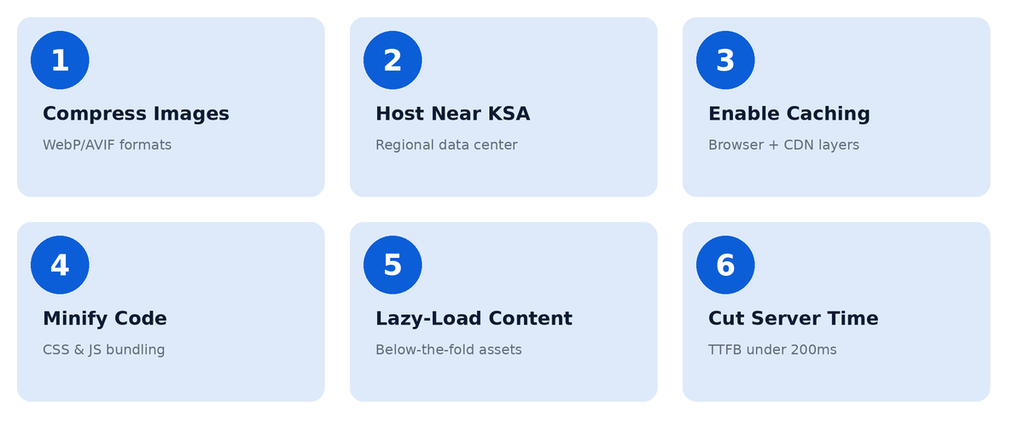
These six practices address the causes above directly, and together they typically bring Largest Contentful Paint (LCP) under Google’s 2.5-second threshold for a “good” score.
1. Compress and Serve Modern Image Formats
Convert images to WebP or AVIF, which produce files 25% to 50% smaller than JPEG at equivalent visual quality. Pair this with responsive srcset attributes so mobile visitors download a smaller file than desktop visitors.
2. Host on a Server Inside or Near Saudi Arabia
Choosing a data center in the Kingdom, or on a regional CDN edge node, cuts round-trip latency significantly for local visitors. This also supports data residency expectations under Saudi Arabia’s Personal Data Protection Law, enforced by SDAIA, for businesses handling KSA user data.
3. Implement Browser Caching and a CDN
Setting cache-control headers lets returning visitors load static assets from their own browser instead of the server. A CDN with an edge node near Riyadh or Jeddah serves that same content from a nearby location for first-time visitors too.
4. Minify and Bundle CSS and JavaScript
Stripping whitespace, comments, and unused code from CSS and JS files, then bundling them into fewer requests, reduces both file size and the number of round trips the browser makes before it can render the page.
5. Lazy-Load Below-the-Fold Content
Images, videos, and iframes below the visible screen should only load as the visitor scrolls toward them. This shrinks the initial page weight and lets the browser prioritize what the visitor sees first.
6. Reduce Server Response Time (TTFB)
Time to First Byte should stay under 200 ms. This depends on efficient database queries, server-side caching, and adequate hosting resources, not just front-end optimization.
Shared Hosting vs. Optimized Infrastructure
Shared hosting is popular because it costs little and requires no server management. It performs very differently from a properly configured, dedicated stack once real traffic arrives.
| Factor | Shared Hosting | Optimized Infrastructure |
|---|---|---|
| Server Response Time | Often 400 ms to 800+ ms under load | Typically under 200 ms |
| Traffic Spikes | Resources shared with other sites, slows unpredictably | Dedicated resources scale independently |
| Regional Latency | Server location fixed, often overseas | CDN edge nodes placed near KSA visitors |
| Core Web Vitals | Rarely passes on mobile | Consistently meets Google’s thresholds |
| Cost | Lower | Higher, scales with traffic |
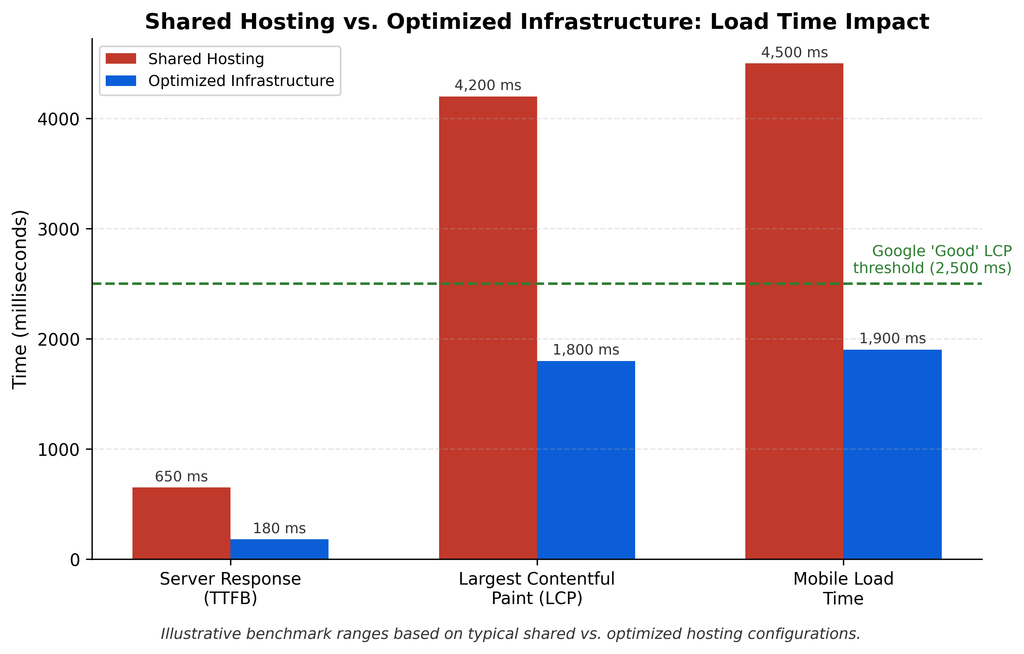
If the website is a low-traffic brochure page, shared hosting may be adequate. If the site handles bookings, checkout, or lead generation where every second of delay costs conversions, the performance gap justifies the investment.
What Does “Website Caching” Really Mean?
Business owners often hear “we’ve enabled caching” without knowing what actually changed. Caching is not one setting, it is several layers working together.
- Browser caching: Instructs a visitor’s browser to store static files (images, CSS, JS) locally, so repeat visits skip re-downloading them.
- Server-side caching: Stores a pre-built version of a dynamic page so the server does not rebuild it from the database on every request.
- CDN caching: Stores copies of static content on edge servers physically closer to the visitor, cutting the distance data has to travel.
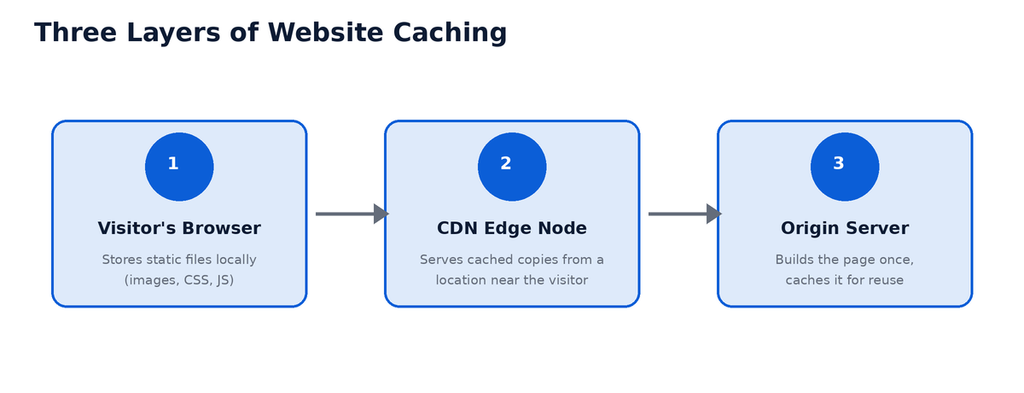
Each layer solves a different bottleneck. A site with only browser caching still suffers slow first visits; a site with only a CDN still rebuilds dynamic pages unnecessarily on the origin server.
Not sure why your website feels slow?
Send us your website URL. We will run a Core Web Vitals audit and tell you which of these six practices is missing before you commit to a rebuild.
Request a Free Speed AuditHow TeckCod Agency Builds Faster Websites
Teckcod Agency engineers performance into every custom build from the architecture stage, rather than treating speed as a plugin added after launch.
The 5-Point Performance Framework
Before writing a single line of front-end code, every project is checked against five criteria:
- Hosting: Is the server located in or near KSA, with resources sized for expected traffic?
- Assets: Are images, fonts, and media optimized and served in modern formats?
- Delivery: Is a CDN configured with edge nodes near the target audience?
- Code: Is CSS and JavaScript minified, bundled, and free of unused dependencies?
- Monitoring: Is Core Web Vitals tracked continuously after launch, not just tested once?
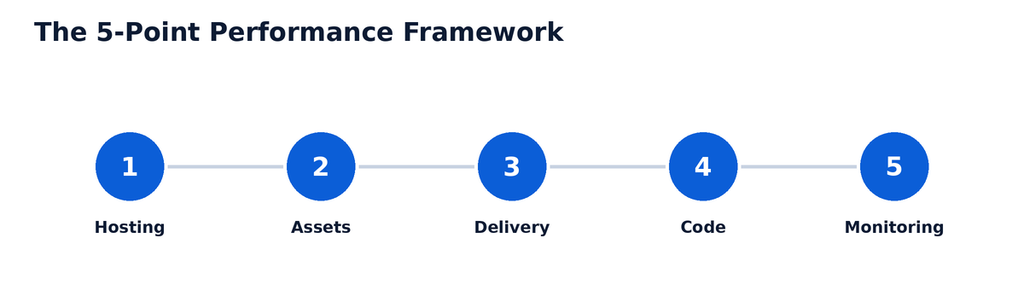
This structured process aligns with Google’s own Core Web Vitals guidance, and with ISO/IEC 25010 software quality standards for performance efficiency.
Keep Your Website Fast as You Scale
A fast website at launch does not stay fast automatically. New content, added plugins, and traffic growth all add weight unless performance is monitored and maintained as part of the build, not a one-time fix.
Whether you are launching a new site or diagnosing why an existing one has slowed down, working with a team that treats performance as core architecture, not an afterthought, prevents the slow creep that eventually costs conversions and search rankings. Explore TeckCod Agency’s web design and development services to see how a performance-first build is planned from the ground up.
Ready to Fix Your Website’s Load Time?
Tell us your current site URL and your main performance concern. Our team will audit your Core Web Vitals and scope a fix, whether that means a rebuild or targeted optimization.
Schedule a Technical AuditFrequently Asked Questions
What is a good page load time for a website in KSA?
Under 2.5 seconds for Largest Contentful Paint on mobile is Google’s threshold for a “good” score. Sites hosted overseas without a regional CDN frequently exceed 4 seconds for KSA visitors, which affects both user experience and search ranking.
Does website speed affect SEO rankings in Saudi Arabia?
Yes. Core Web Vitals are a confirmed Google ranking signal globally, including for Saudi search results. A slow site can rank lower even with strong content, since Google factors in the mobile experience directly.
Is shared hosting enough for a business website?
For a low-traffic brochure site, shared hosting can be adequate. For sites handling bookings, e-commerce, or lead forms, the response-time and reliability gap under real traffic usually justifies dedicated or optimized infrastructure.